
Anyone who has deployed an embedded Linux system knows the visual silence at startup: power is on and software is progressing, yet the display still looks dead.
A few seconds later the panel may wake, show a temporary splash, flicker during initialization, and only then reveal the real application. Even on a fast system, that sequence can feel fragile because the limiting problem is often not compute performance. It is display ownership during boot.
For industrial HMIs, medical equipment, and mobility products, an uncertain startup sequence affects more than appearance. It changes how quickly users trust that the product is working.
The root cause
Why does an embedded Linux display go black during boot?
In a conventional boot flow, no single component owns the display from start to finish. A bootloader may initialize the panel, the kernel may later reconfigure the hardware, DRM brings up the graphics path, and finally a userspace compositor and application become the active renderer.
Each stage can be correct on its own while the boundaries between stages still cause a panel reset, black frame, exposed compositor state, or timing-dependent flicker. The visible artifact comes from fragmented ownership.
Immediate feedback
How GraphLab produces the first visible pixel
The bootloader loads and starts GraphLab Core on the platform’s real-time core during early boot. The real-time core initializes the display path and presents a controlled frame before Linux is ready.
The shared architecture supports three early experiences. GraphLab Splash presents approved branding. GraphLab Boot adds status and progress tied to observed milestones, plus defined fallback behavior. GraphLab Pro combines Boot with real-time graphics library access for customer-developed early interfaces. Linux and the existing application continue to start on the application cores.
The approximately 800 ms result was measured with GraphLab Boot on the validated Verdin reference.
It does not mean Linux reaches userspace or the application becomes interactive in 800 ms. Linux startup proceeds at its normal pace in parallel.
The product choice defines the early content and behavior. Platform support, integration, and acceptance are agreed for the target configuration. Pro interfaces that use live data or controls need those paths to be available independently of Linux.
One persistent owner
How the display stays active until Linux is ready
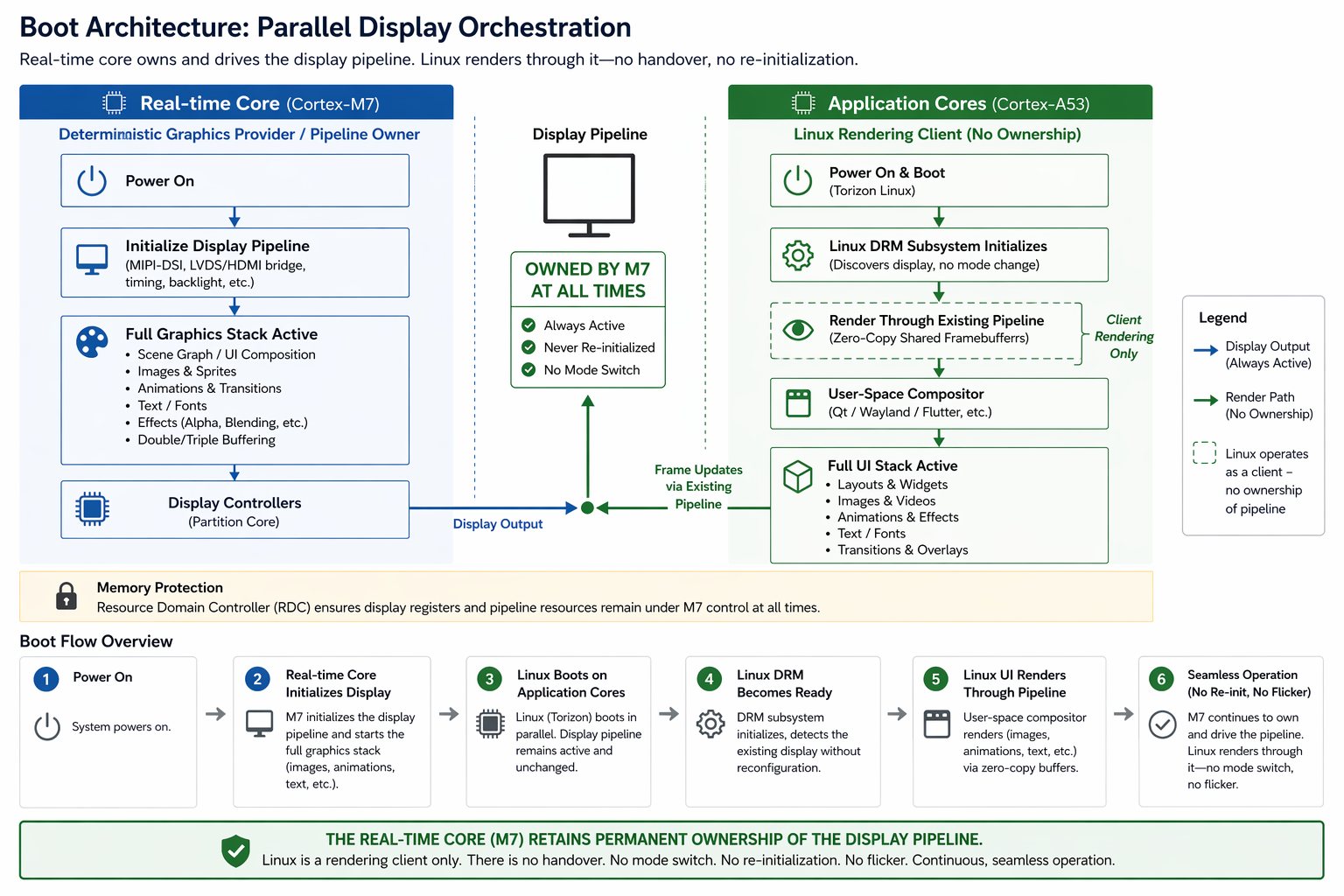
GraphLab Splash, Boot, and Pro avoid the conventional ownership handover. The real-time core remains responsible for the active display pipeline while Linux joins the running system as a renderer.
Torizon, the Linux graphics stack, the compositor, and the UI container all start in the background. Linux renders into shared framebuffers connected to the live pipeline, and the visible output changes only when the Linux frame meets the project’s readiness contract.
The selection can be based on agreed frame activity or triggered explicitly through a sysfs control. With GraphLab Boot or Pro, a project-defined maintenance, restart, or recovery flow can also return the visible output to a defined real-time render state.
Continuous output is not the same as faster application startup.
The improvement is that users see a designed state throughout the existing startup time instead of watching internal Linux initialization stages.
Parallel display orchestration
How the architecture works without a handover
GraphLab runs on the platform’s real-time processor or core; the specific core varies by SoC. On the Verdin iMX8M Plus reference, GraphLab Core uses the Cortex-M7 to initialize and retain the display path while Torizon runs on the Cortex-A53 application cores.
Linux does not stream every frame through the real-time core. Instead, the real-time core keeps the display engine active while Linux renders directly into zero-copy shared framebuffers. On this reference platform, the Resource Domain Controller protects the relevant display resources from an accidental Linux-side reconfiguration, and a dedicated DRM driver exposes the existing pipeline without transferring physical ownership.
Validated reference
What changes on Toradex Verdin iMX8M Plus
The measured setup uses a Toradex Verdin iMX8M Plus on a standard carrier, an LVDS display, a Torizon OS reference image, the standard Linux graphics environment, and GraphLab Boot integrated into early boot.
This is a platform-specific result. A different module, carrier, display interface, panel, power sequence, BSP, or application requires its own assessment and validation.
Same hardware, different visible path
Results on real hardware
The comparison below follows two systems from power-on to the same application. GraphLab Boot provides controlled output during early display bring-up and keeps that state visible while Linux starts. The standard path passes through blank and transitional states before reaching the UI.
Observed on real hardware
What the boot stages look like
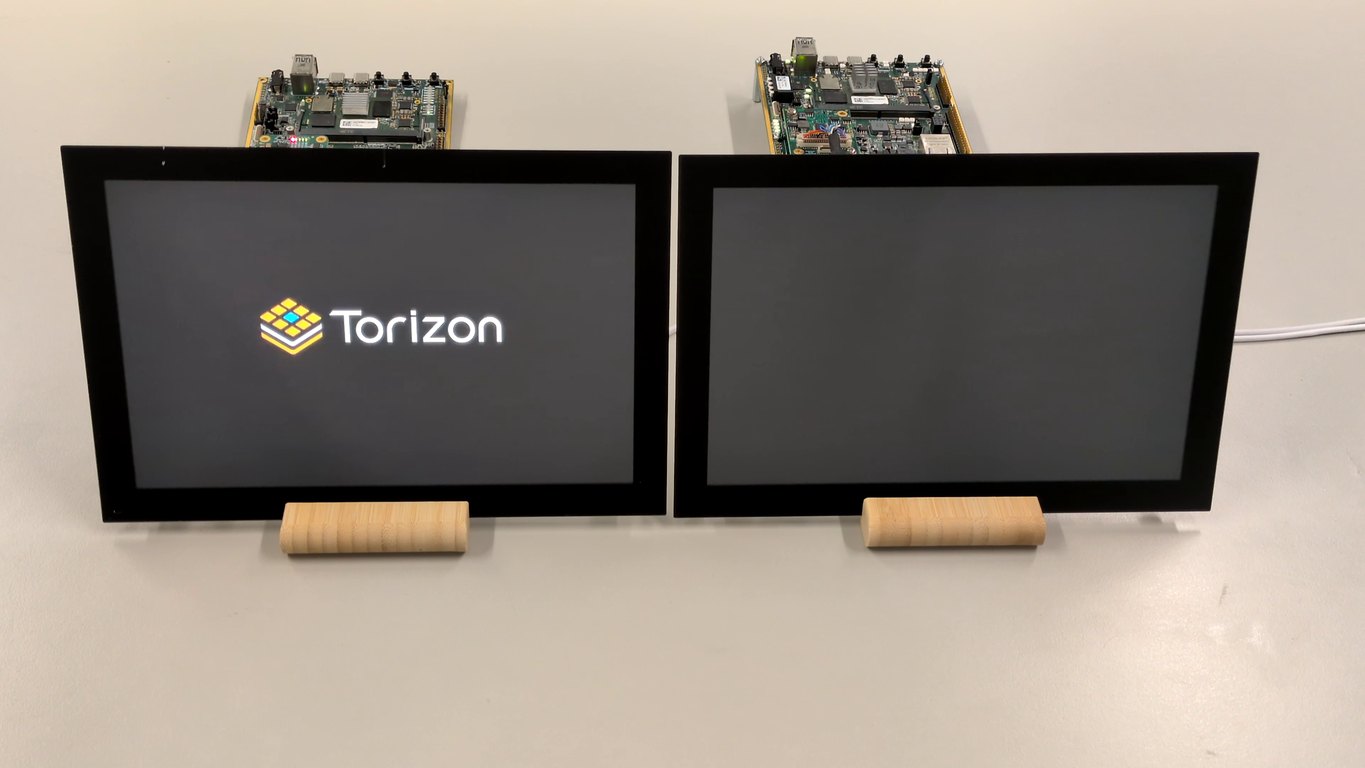
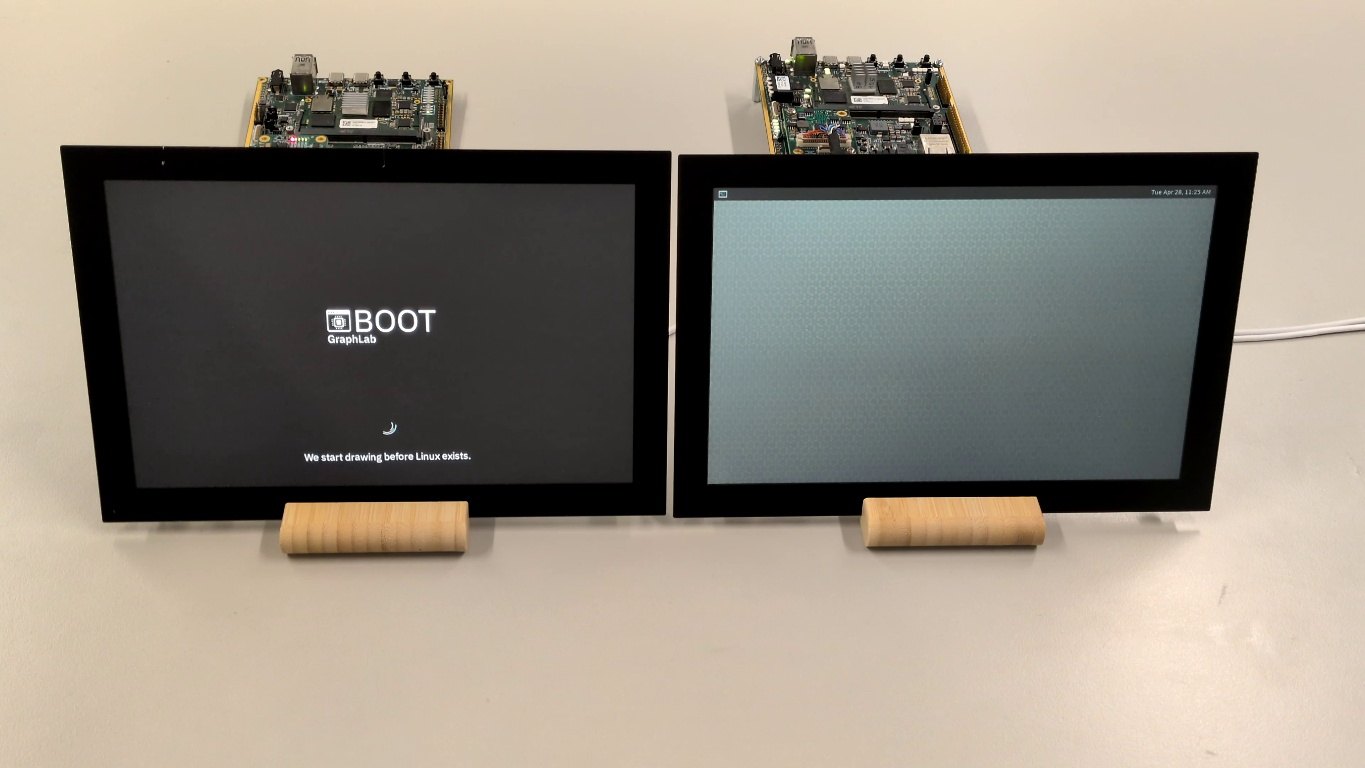
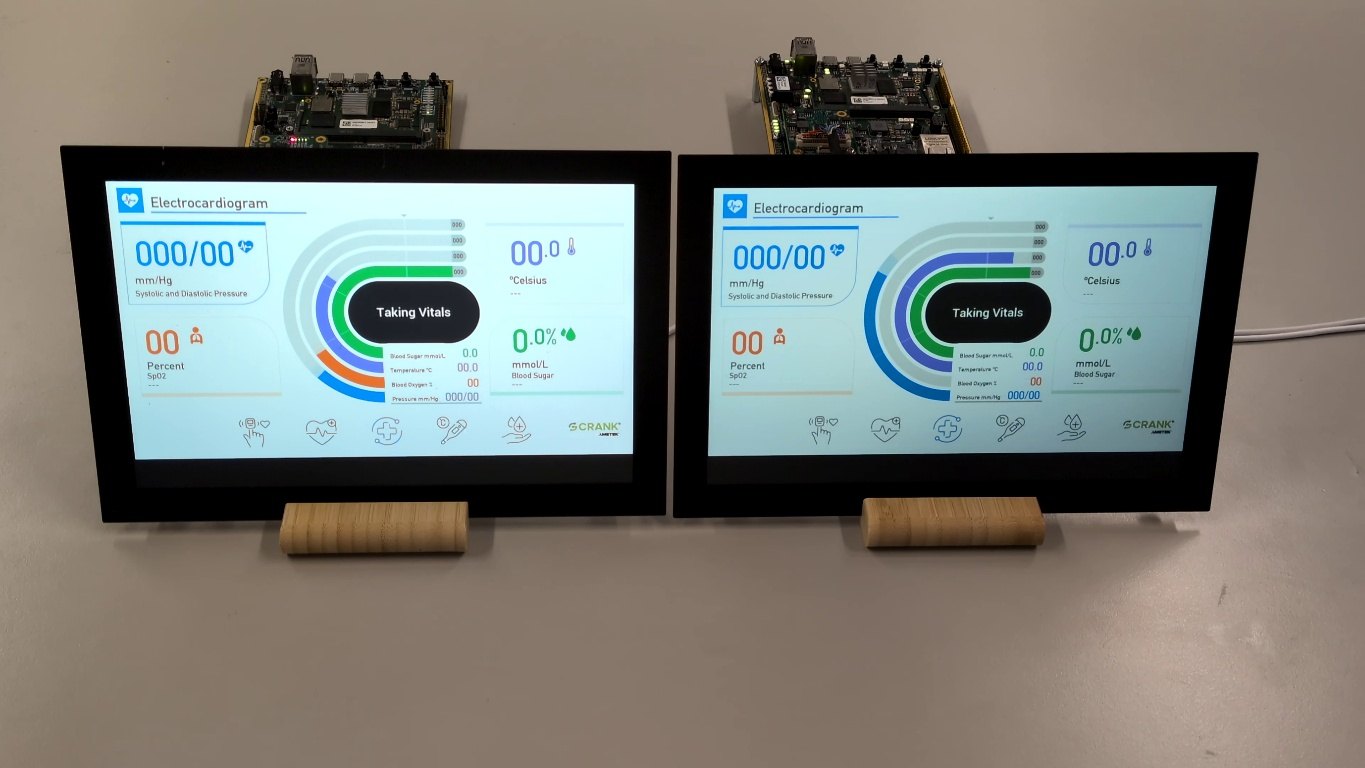
On this hardware, GraphLab Boot reaches the first visible pixel in approximately 800 ms and maintains controlled output while the Linux application continues its normal startup.
When the accepted Linux-rendered frame is selected, the final application replaces the early content without a user-visible panel reset, black frame, or exposed compositor screen.
The strongest result is not only that the screen turns on earlier. It is that the user does not see the internal choreography of bootloader, DRM, compositor, and application initialization.
Side-by-side evidence
Standard Torizon versus GraphLab Boot
The same class of hardware is shown side by side. Compare visible output continuity, not Linux application boot duration. The GraphLab Boot side keeps a designed frame visible until the Linux-rendered application is ready. Linux application time-to-ready is not reduced.
Keep the Linux application model
What compatibility looks like in practice
The shared GraphLab architecture changes how the display path is initialized, protected, and exposed during boot. It does not require the application-side graphics framework to be rewritten.
The GraphLab Boot reference on Verdin with Torizon has been demonstrated with Toradex Demo Gallery examples using Qt, Embedded Wizard, and Crank Storyboard. Those examples demonstrate the named setup, not universal compatibility with every compositor, framework, or container design.
Integration remains deliberate. The reference includes an SPL hook for early real-time firmware startup, the required device-tree configuration, a dedicated DRM driver, shared memory, and an explicit switching policy.
Where continuity matters
A startup experience users can trust
Show immediate operator feedback and keep the machine startup sequence visually controlled.
Present an intentional, visible progression from power-on to the usable application.
Avoid repeated blanking and visible mode changes in a prominent cockpit or cabin display.
Improve the display path without forcing every application team to redesign its Linux UI.
Start from a known baseline
How to evaluate GraphLab for your product
Choose Splash for approved branding, Boot for observed status and defined fallback, or Pro for a customer-developed early interface. The GraphLab Boot reference image and familiar Toradex Demo Gallery projects on the validated Verdin iMX8M Plus setup demonstrate the shared display architecture from first display initialization through the final application frame.
For another target, assess the SoC, display controller, panel and bridge path, boot firmware, memory protection, BSP, compositor, and application readiness signal before making a continuity claim.
Integration reality
Where maintenance lives
A production design should name the integration surfaces and their owners. “Seamless” describes the visible result; it does not mean zero engineering or zero maintenance.
Maintain the small early-boot loading and start hook against the supported Toradex Bootloader baseline, and verify real-time core startup after every bootloader rebase.
Document the required device-tree changes against the supported Torizon BSP. Recheck LVDS timing, routing, reserved memory, and peripheral protection for the target configuration.
Build and validate the dedicated DRM driver against the supported kernel. Recheck atomic state, formats, acceleration, and framebuffer presentation after kernel changes.
Version the automatic or explicit switch policy with the application. Test timeouts and incomplete frames; for Boot and Pro, also test the agreed restart and return-to-real-time behavior.
For each supported BSP update, compare Bootloader, kernel, device tree, and real-time firmware compatibility, then repeat the recorded boot matrix.
Conclusion
Embedded Linux does not have to begin with a black screen
Black frames and flicker are usually consequences of fragmented display ownership, not unavoidable limitations of Linux. On the validated Verdin iMX8M Plus reference, the real-time core brings the display up early, retains authority while Torizon starts, and selects the Linux-rendered UI only when it is ready to be shown.
For teams building user-facing embedded products, that creates a more controlled startup experience while preserving the familiar Linux rendering environment on the application side.
Frequently asked questions
Technical questions, answered
Does this architecture apply to Splash, Boot, and Pro?
Yes. All three retain display authority on the real-time core while Linux renders into shared framebuffers. They differ in early content and behavior. The measurements and comparison on this page demonstrate GraphLab Boot on the named reference setup; they are not timing guarantees for Splash, Pro, or another configuration.
Does GraphLab require changes to the Linux graphics stack?
It does not require the application framework to be rewritten. The integration changes how the display pipeline is initialized, protected, exposed through the dedicated DRM driver, and switched at the agreed readiness point.
Does Linux render through the real-time core?
No. The real-time core is not a per-frame rendering bottleneck. It retains the active display path while Linux renders directly into shared framebuffers connected to that path.
When does the Linux output become visible?
The switch can follow agreed frame activity or an explicit sysfs signal from the application. The exact readiness contract is defined and validated for the target integration.
Can the display return to real-time rendering?
GraphLab Boot and Pro support this behavior. A project-defined maintenance, restart, or recovery flow can return the visible output to a defined real-time render state. The content and switching policy are agreed per project.
Can the early screen show real progress?
GraphLab Boot can connect status and progress to agreed, observed boot, display, and UI-ready milestones. It does not simulate time-based progress or imply that Linux starts faster.
Is the result limited to Verdin iMX8M Plus?
The approximately 800 ms result is validated only on the named Verdin iMX8M Plus reference setup. Other heterogeneous SoCs and display paths require project-specific assessment and validation.
Technical references
- Toradex: Instant flicker-free boot on Verdin with Torizon · Primary publication for the GraphLab Boot reference and measured result.
- Toradex Verdin iMX8M Plus · Module and hardware resources.
- Toradex embedded Linux release matrix · BSP, kernel, Yocto, and Bootloader baselines.
- Setting up displays with Torizon · DRM/KMS and display configuration guidance.